If you’d like a hand in building this or anything like it, I’m open to taking on new clients. See the end of this article to learn more.
If you’ve built an app with OpenSaaS, the open-sourced SaaS template built using Wasp, you know how incredibly easy the authentication flow is to set up. But that smooth sailing often hits a wall when you try to leave the browser tab and authenticate with a different client than your web app.
When I started building the Chrome extension for RecipeCast, a web app that gives users the ability to cast a recipe to a TV or smart display, I ran into a classic problem: my extension needed to talk to my API, but my API only understood browser cookies. External clients live in a different world—they have isolated storage, strict origin policies, and no access to the convenient cookie jar that powers your web app’s session.
To solve this, I had to architect a bridge between these two worlds. I came across this crucially helpful gist by a fellow Wasp user 🙏 that became my guide. The result is an OAuth 2.0-like authentication flow that allows the extension to securely mint its own portable tokens without compromising the main app’s security.
This series is the blueprint of that system. I’m going to show you exactly how to implement it, starting today with the foundational architecture.
The Architecture: Breaking Out of the Browser with OAuth
When your Wasp app runs in a browser (e.g., at https://recipecast.app), authentication is straightforward:
- You log in
- Wasp creates a session cookie
- Browser automatically sends that cookie with every request on your web app
Chrome extensions have their own origin (chrome-extension://…) and can’t share cookies with your domain.
What these clients need is something portable: a token they can store, send with each request to your Wasp app API, and refresh when it expires. In other words, you need to implement OAuth 2.0-style authentication.
The Flow
Here is the architecture we will implement today:
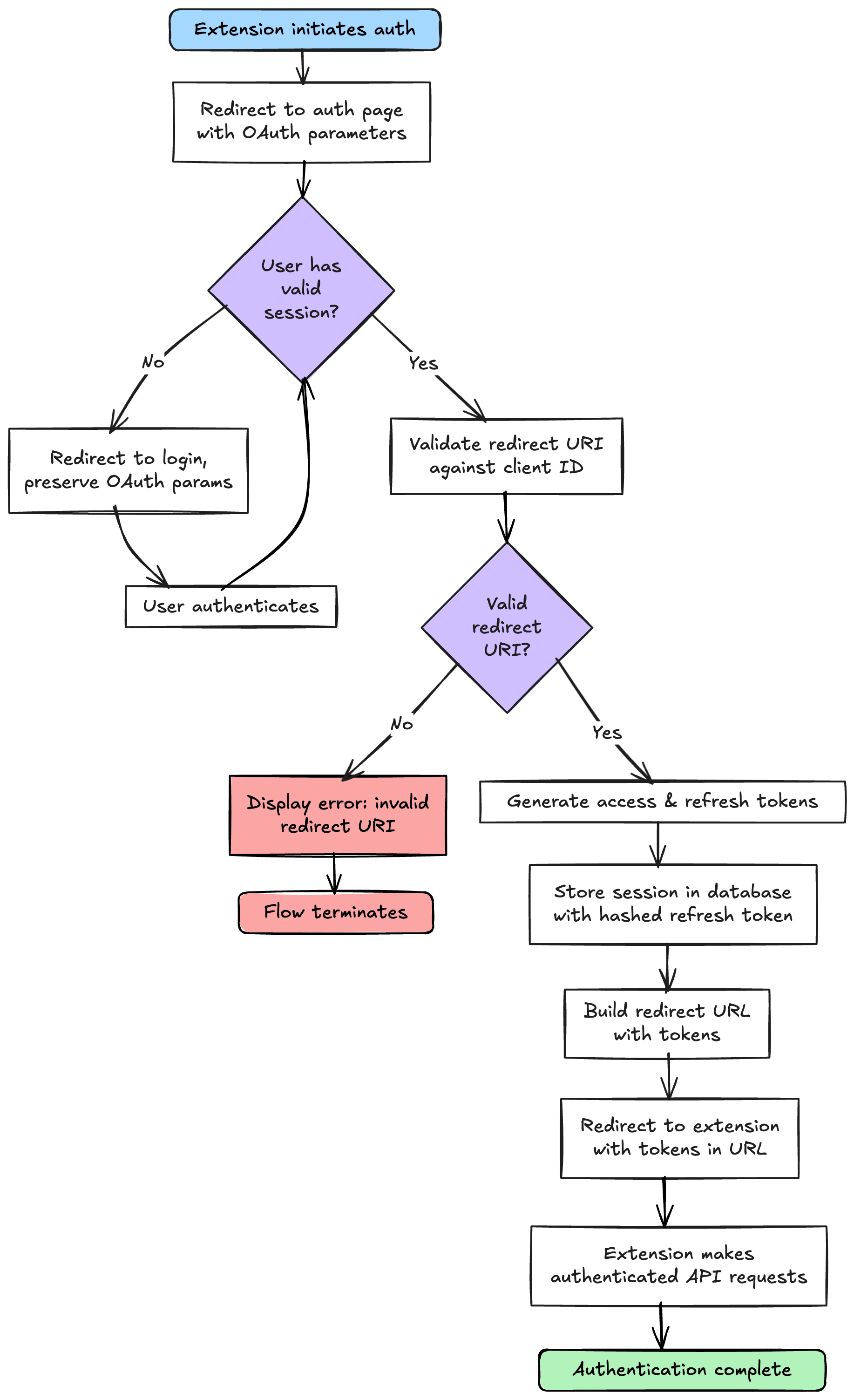
The Vault: Database Schema
Before we can generate credentials, we need a safe place to store them. External client sessions need their own storage, separate from Wasp’s built-in session management.
Add this to your schema.prisma:
model UserExternalSession {
  id                 String   @id @default(uuid())
  userId             String
  deviceId           String   // Unique identifier for the client device/extension
  hashedRefreshToken String   // Never store refresh tokens in plaintext!
  expiresAt          DateTime
  createdAt          DateTime @default(now())
  user               User     @relation(fields: [userId], references: [id], onDelete: Cascade)

  @@unique([userId, deviceId])
  @@index([userId])
}
Add to your User model:
model User {
  id        String   @id @default(uuid())
  // ... your existing User fields ...
  externalSessions UserExternalSession[]
}
Key Design Decisions
deviceId: This is the key to multi-device support. It allows users to have multiple devices authorized simultaneously and revoke access to specific devices without affecting others.hashedRefreshToken: We treat refresh tokens like passwords.@@unique([userId, deviceId]): This constraint ensures each device gets exactly one session per user. If a user re-authorizes, we update the existing session rather than creating duplicates.
Security Note: Never store refresh tokens in plaintext. If your database is compromised, attackers could use plaintext tokens to impersonate users. By hashing them with
bcrypt, leaked tokens are useless.
The Mint: Backend Logic
We’ll split our backend logic into three files to keep things organized and scalable: core.ts (logic), operations.ts (Wasp actions), and endpoints.ts (HTTP APIs).
1. Core logic
This file holds the pure business logic for minting tokens. It doesn’t know about Wasp contexts or HTTP requests.
// app/src/auth/external/core.ts
import jwt from "jsonwebtoken";
import bcrypt from "bcryptjs";
import crypto from "crypto";

const JWT_SECRET = process.env.JWT_SECRET!;
const ACCESS_TOKEN_EXPIRY = "1h";
const REFRESH_TOKEN_EXPIRY_DAYS = 7;

export async function generateTokenForUser(
  userId: string,
  deviceId: string,
  entities: any
) {
  // 1. Generate short-lived access token (JWT)
  const accessToken = jwt.sign(
    {
      userId,
      deviceId,
      type: "external_access",
    },
    JWT_SECRET,
    { expiresIn: ACCESS_TOKEN_EXPIRY }
  );
  // 2. Generate long-lived refresh token (random bytes)
  const refreshToken = crypto.randomBytes(64).toString("hex");

  // 3. Hash the refresh token before storing
  const hashedRefreshToken = await bcrypt.hash(refreshToken, 10);

  // 4. Calculate expiration date
  const expiresAt = new Date();
  expiresAt.setDate(expiresAt.getDate() + REFRESH_TOKEN_EXPIRY_DAYS);

  // 5. Upsert the session
  await entities.UserExternalSession.upsert({
    where: {
      userId_deviceId: { userId, deviceId },
    },
    create: {
      userId,
      deviceId,
      hashedRefreshToken,
      expiresAt,
    },
    update: {
      hashedRefreshToken,
      expiresAt,
    },
  });

  return {
    accessToken,
    refreshToken,
  };
}
Security Note: While
JWT_SECRETworks, in Part 3 we’ll discuss using per-user JWT secrets for advanced revocation capabilities.
2. Wasp action
This is the bridge between the frontend and our core logic. We use a Wasp Action because it automatically validates the session cookie (context.user) for us.
// app/src/auth/external/operations.ts
import type { GenerateExternalTokenAction } from "wasp/server/operations";
import { HttpError } from "wasp/server";
import { generateTokenForUser } from "./core.js";

export const generateExternalTokenAction: GenerateExternalTokenAction = async (
  { deviceId, clientId },
  context
) => {
  if (!deviceId || typeof deviceId !== "string") {
    throw new HttpError(400, "Missing or invalid deviceId");
  }

  // SECURITY: Validate the client ID against our allowlist
  // This prevents unauthorized extensions from requesting tokens even if they fake the UI
  if (clientId) {
    const allowedIds =
      process.env.ALLOWED_CHROME_EXTENSION_IDS?.split(",") || [];
    if (!allowedIds.includes(clientId)) {
      throw new HttpError(403, "Unauthorized client ID");
    }
  }

  // Wasp automatically verifies the session cookie for us!
  if (!context.user) {
    throw new HttpError(401, "Not authenticated");
  }

  return generateTokenForUser(context.user.id, deviceId, context.entities);
};
3. API placeholders
We’ll implement the full API logic in Part 2, but we need to define these files now so our Wasp configuration will be valid.
// app/src/auth/external/api.ts
import { HttpError } from "wasp/server";

export const generateExternalToken = async (req, res, context) => {
  res.status(501).json({ message: "Not implemented yet" });
};

export const refreshExternalToken = async (req, res, context) => {
  res.status(501).json({ message: "Not implemented yet" });
};

export const revokeExternalToken = async (req, res, context) => {
  res.status(501).json({ message: "Not implemented yet" });
};
3. Middleware
We’ll also need a basic middleware file to prevent compile errors. This file will later hold our CORS logic and any rate limiting:
// app/src/auth/external/middleware.ts
import { MiddlewareConfigFn } from "wasp/server";

export const externalApiMiddleware: MiddlewareConfigFn = middlewareConfig => {
  return middlewareConfig;
};
The Routing Number: Wasp Configuration
Now we include everything in main.wasp. This setup prepares us for both the UI-based auth flow (using the action) and the background API flows (using the API endpoints).
// 1. API Namespace Configuration
apiNamespace external {
  middlewareConfigFn: import { externalApiMiddleware } from "@src/auth/external/middleware",
  path: "/api/external/",
}

// 2. HTTP API Endpoints
api generateExternalToken {
  fn: import { generateExternalToken } from "@src/auth/external/api",
  httpRoute: (POST, "/api/external/token"),
  auth: false, // We'll handle auth manually for APIs
  entities: [User, UserExternalSession],
}

api refreshExternalToken {
  fn: import { refreshExternalToken } from "@src/auth/external/api",
  httpRoute: (POST, "/api/external/token/refresh"),
  auth: false,
  entities: [User, UserExternalSession],
}

api revokeExternalToken {
  fn: import { revokeExternalToken } from "@src/auth/external/api",
  httpRoute: (POST, "/api/external/token/revoke"),
  auth: false,
  entities: [User, UserExternalSession],
}

// 3. Wasp Action (For the OAuthTokenGrantPage)
action generateExternalTokenAction {
  fn: import { generateExternalTokenAction } from "@src/auth/external/operations",
  entities: [User, UserExternalSession],
  auth: true // Critical: Requires valid session cookie
}

// 4. Authorization Page Route
route OAuthTokenGrantRoute {
  path: "/auth/external/authorize",
  to: OAuthTokenGrantPage
}

page OAuthTokenGrantPage {
  authRequired: false, // critical
  component: import OAuthTokenGrantPage from "@src/auth/external/OAuthTokenGrantPage"
}
The Handshake: Authorization Page
Finally, we create the frontend component for our OAuthTokenGrantPage.
Note that we disabled Wasp’s automatic authRequired redirect because if Wasp handles the redirect, it will lose the OAuth query parameters (client_id, redirect_uri, state). By checking auth manually, we can construct a login URL that brings the user right back with all necessary data intact.
We’ll be adding robust loop detection (verifyNoRedirectLoop) and extension ID validation (validateRedirectUriForExtension)—utilities we’ll fully flesh out in Part 2, but placeholders are there for now.
// app/src/auth/external/OAuthTokenGrantPage.tsx
import { useEffect, useState, useRef, useCallback } from "react";
import { useAuth } from "wasp/client/auth";
import { useSearchParams, useNavigate, useLocation } from "react-router-dom";
import { generateExternalTokenAction } from "wasp/client/operations";
import { AuthPageLayout } from "../AuthPageLayout"; // Or your default layout
// These are utilities we'll implement in Part 2
import { verifyNoRedirectLoop } from "../../utils/redirectValidation";
import { validateRedirectUriForExtension } from "../../utils/chromeExtensionValidation";

// Constants
const LOGIN_REDIRECT_DELAY_MS = 3000;
const SUCCESS_REDIRECT_DELAY_MS = 3000;
const ACCESS_TOKEN_EXPIRY_SECONDS = "3600";
const DEVICE_ID_STORAGE_PREFIX = "recipecast:deviceId:";

// Types
type OAuthStatus =
  | "authorizing"
  | "authorized"
  | "error"
  | "redirecting_to_login";

interface OAuthParams {
  clientId: string | null;
  redirectUri: string | null;
  state: string | null;
  responseType: string;
}

// Helper Functions

function getOrCreateDeviceId(clientId: string): string {
  const storageKey = `${DEVICE_ID_STORAGE_PREFIX}${clientId}`;

  // Try to get existing device ID from localStorage
  try {
    const storedDeviceId = localStorage.getItem(storageKey);
    if (storedDeviceId) {
      return storedDeviceId;
    }
  } catch (error) {
    // localStorage might not be available (e.g., private browsing, disabled, quota exceeded)
    console.warn(
      "[OAuth Token Grant] localStorage not available, generating new device ID:",
      error
    );
    // Fall through to generate a new device ID
  }

  // Generate new device ID
  const deviceId = crypto.randomUUID();

  // Try to store it, but don't fail if storage is unavailable
  try {
    localStorage.setItem(storageKey, deviceId);
  } catch (error) {
    // localStorage write failed (quota exceeded, private browsing, etc.)
    // Log warning but continue - device ID will be regenerated next time
    console.warn(
      "[OAuth Token Grant] Failed to store device ID in localStorage:",
      error
    );
    console.warn(
      "[OAuth Token Grant] Device ID will be regenerated on next authorization"
    );
  }

  return deviceId;
}

function buildLoginRedirectPath(
  currentPath: string,
  currentSearch: string
): string {
  return `/login?redirect=${encodeURIComponent(currentPath + currentSearch)}`;
}

function buildRedirectUrlWithTokens(
  redirectUri: string,
  accessToken: string,
  refreshToken: string,
  state: string | null,
  responseType: string
): string {
  const redirectUrl = new URL(redirectUri);

  if (responseType === "token") {
    // Implicit flow: tokens in URL fragment (after #)
    redirectUrl.hash = new URLSearchParams({
      access_token: accessToken,
      refresh_token: refreshToken,
      token_type: "Bearer",
      expires_in: ACCESS_TOKEN_EXPIRY_SECONDS,
      ...(state && { state }),
    }).toString();
  } else {
    // Authorization code flow: codes in query params (future enhancement)
    redirectUrl.searchParams.set("code", accessToken);
    if (state) redirectUrl.searchParams.set("state", state);
  }
  return redirectUrl.toString();
}

function validateOAuthParams(params: OAuthParams): {
  isValid: boolean;
  error?: string;
} {
  if (!params.clientId || !params.redirectUri) {
    return {
      isValid: false,
      error:
        "Missing required OAuth parameters: client_id and redirect_uri are required",
    };
  }
  if (!verifyNoRedirectLoop(params.redirectUri)) {
    return {
      isValid: false,
      error:
        "Invalid redirect_uri: cannot redirect to token grant page (would create infinite loop)",
    };
  }
  const validationResult = validateRedirectUriForExtension(
    params.redirectUri,
    params.clientId
  );
  if (!validationResult.isValid) {
    return {
      isValid: false,
      error: validationResult.error || "Invalid redirect_uri",
    };
  }
  return { isValid: true };
}

function LoadingView({ message }: { message: string }) {
  return (
    <>
      <h3 className="mb-2">{message}</h3>
      <p className="text-muted-foreground">Please wait.</p>
    </>
  );
}

function ErrorView({ error }: { error: string }) {
  return (
    <>
      <h3 className="mb-2">Token Grant Failed</h3>
      <p className="text-muted-foreground mb-4">{error}</p>
      <p className="text-sm text-muted-foreground">
        Please close this window and try again from the external client.
      </p>
    </>
  );
}

function SuccessView() {
  return (
    <>
      <h3 className="mb-2">Tokens Granted Successfully</h3>
      <p className="text-muted-foreground mb-4">
        <strong className="text-green-600 dark:text-green-400">
          You're signed in!
        </strong>
        <br />
        <span className="text-sm">Redirecting...</span>
      </p>
    </>
  );
}

export default function OAuthTokenGrantPage() {
  const { data: user, isLoading: authLoading } = useAuth();
  const [searchParams] = useSearchParams();
  const navigate = useNavigate();
  const location = useLocation();
  const [status, setStatus] = useState<OAuthStatus>("authorizing");
  const [error, setError] = useState<string | null>(null);

  const hasRedirected = useRef(false);
  const hasAttempted = useRef(false);
  const redirectTimeoutRef = useRef<NodeJS.Timeout | null>(null);

  // Extract OAuth parameters
  const oauthParams: OAuthParams = {
    clientId: searchParams.get("client_id"),
    redirectUri: searchParams.get("redirect_uri"),
    state: searchParams.get("state"),
    responseType: searchParams.get("response_type") || "token",
  };

  // Cleanup function for timeouts
  const cleanupTimeout = useCallback(() => {
    if (redirectTimeoutRef.current) {
      clearTimeout(redirectTimeoutRef.current);
      redirectTimeoutRef.current = null;
    }
  }, []);

  // Handle redirect to login
  const handleLoginRedirect = useCallback(() => {
    if (hasRedirected.current) {
      return;
    }
    const loginPath = buildLoginRedirectPath(
      location.pathname,
      location.search
    );
    setStatus("redirecting_to_login");
    hasRedirected.current = true;
    cleanupTimeout();
    redirectTimeoutRef.current = setTimeout(() => {
      console.log("[OAuth Token Grant] Redirecting to login...");
      navigate(loginPath, { replace: true });
    }, LOGIN_REDIRECT_DELAY_MS);
  }, [location.pathname, location.search, navigate, cleanupTimeout]);

  // Handle token generation and redirect
  const handleTokenGeneration = useCallback(async () => {
    if (
      hasAttempted.current ||
      !oauthParams.clientId ||
      !oauthParams.redirectUri
    ) {
      return;
    }
    hasAttempted.current = true;
    try {
      const deviceId = getOrCreateDeviceId(oauthParams.clientId);
      const result = await generateExternalTokenAction({
        deviceId,
        clientId: oauthParams.clientId,
      } as any);
      if (hasRedirected.current) {
        console.log(
          "[OAuth Token Grant] Already redirected, ignoring duplicate redirect attempt"
        );
        return;
      }
      hasRedirected.current = true;
      setStatus("authorized");
      console.log(
        "[OAuth Token Grant] Token grant successful! Redirecting in 3 seconds..."
      );
      const redirectUrl = buildRedirectUrlWithTokens(
        oauthParams.redirectUri,
        result.accessToken,
        result.refreshToken,
        oauthParams.state,
        oauthParams.responseType
      );
      cleanupTimeout();
      redirectTimeoutRef.current = setTimeout(() => {
        console.log("[OAuth Token Grant] Redirecting now...");
        window.location.replace(redirectUrl);
      }, SUCCESS_REDIRECT_DELAY_MS);
    } catch (err: any) {
      console.error("Token grant error:", err);
      setError(err.message || "Failed to grant OAuth tokens");
      setStatus("error");
    }
  }, [oauthParams, cleanupTimeout]);

  // Main effect
  useEffect(() => {
    // Early return if already processed
    if (
      hasAttempted.current ||
      hasRedirected.current ||
      status === "authorized"
    ) {
      return cleanupTimeout;
    }
    // Handle unauthenticated user
    if (!authLoading && !user) {
      handleLoginRedirect();
      return cleanupTimeout;
    }
    // Wait for auth to complete
    if (authLoading || !user) {
      return cleanupTimeout;
    }
    // Validate OAuth parameters
    const validation = validateOAuthParams(oauthParams);
    if (!validation.isValid) {
      setError(validation.error || "Invalid OAuth parameters");
      setStatus("error");
      if (validation.error?.includes("Redirect loop")) {
        console.error("[OAuth Token Grant] Redirect loop detected", {
          redirectUri: oauthParams.redirectUri,
        });
      } else {
        console.error("[OAuth Token Grant] Invalid redirect_uri", {
          clientId: oauthParams.clientId,
          redirectUri: oauthParams.redirectUri,
        });
      }
      return cleanupTimeout;
    }
    // Generate tokens
    handleTokenGeneration();
    return cleanupTimeout;
  }, [
    user,
    authLoading,
    status,
    oauthParams.clientId,
    oauthParams.redirectUri,
    oauthParams.state,
    oauthParams.responseType,
    handleLoginRedirect,
    handleTokenGeneration,
    cleanupTimeout,
  ]);

  // Render UI based on status
  const renderContent = () => {
    if (authLoading || status === "redirecting_to_login") {
      return (
        <LoadingView
          message={
            status === "redirecting_to_login"
              ? "Redirecting to login..."
              : "Checking authentication..."
          }
        />
      );
    }
    if (status === "authorizing") {
      return <LoadingView message="Granting OAuth tokens..." />;
    }
    if (status === "error") {
      return <ErrorView error={error || "An unknown error occurred"} />;
    }
    return <SuccessView />;
  };
  return (
    <AuthPageLayout>
      <div className="flex flex-col items-center justify-center min-h-[400px] text-center">
        {renderContent()}
      </div>
    </AuthPageLayout>
  );
}
Critical Step: Handling the Redirect with a Custom Hook
In many OpenSaaS apps, you may have a configured onAuthSucceededRedirectTo route (often /dashboard or similar) in your main.wasp. This means when a user logs in via your login page, Wasp will automatically send a user there.
This will break your OAuth flow if you don’t handle it. The user will get stuck on that landing page instead of bouncing back to the OAuth authorization page.
To fix this cleanly, create a reusable custom hook. This hook detects if there is a pending redirect and forwards the user immediately.
1. Create the hook:
// app/src/client/hooks/useOAuthRedirect.ts
import { useEffect } from "react";
import { useAuth } from "wasp/client/auth";
import { useNavigate } from "react-router-dom";

/**
 * Custom hook to handle OAuth redirect after authentication
 * Handles redirects stored in sessionStorage (e.g., after Google OAuth login)
 */
export function useOAuthRedirect() {
  const { data: user, isLoading: authLoading } = useAuth();
  const navigate = useNavigate();
  const OAUTH_REDIRECT_KEY = "oauth-redirect-url";

  // Utility stub
  const validateRedirectUrl = (url: string | null, opts: any) => {
    // In production, validate this is a relative URL or whitelisted domain
    if (!url || !url.startsWith("/")) return null;
    return url;
  };

  useEffect(() => {
    if (!authLoading && user) {
      const storedRedirect = sessionStorage.getItem(OAUTH_REDIRECT_KEY);
      const safeRedirect = validateRedirectUrl(storedRedirect, {
        returnNullOnInvalid: true,
      });

      if (safeRedirect) {
        console.log(
          "[App] Found OAuth redirect in sessionStorage, redirecting to:",
          safeRedirect
        );
        console.log(
          "[App] This redirects back to authorize page to complete OAuth flow"
        );
        sessionStorage.removeItem(OAUTH_REDIRECT_KEY);
        navigate(safeRedirect, { replace: true });
      } else if (storedRedirect) {
        // Found an invalid/malicious redirect value; remove it and stay on page
        console.warn("[App] Ignoring invalid OAuth redirect value");
        sessionStorage.removeItem(OAUTH_REDIRECT_KEY);
      }
    }
  }, [user, authLoading, navigate]);
}
Troubleshooting Tip: If you find yourself in an infinite redirect loop between
/loginand the authorize page, verify two things:
1. YourvalidateRedirectUrlis correctly validating the stored URL (and returning it).
2.sessionStorage.removeItemis being called before the navigation happens.
2. Use it in your main App component (e.g. App.tsx):
import { useOAuthRedirect } from "./hooks/useOAuthRedirect";

export default function App() {
  useOAuthRedirect();
  return (
    // ... Your actual App content ...
    <div>Welcome to the App!</div>
  );
}
Testing
You now have a complete authorization loop. Let’s test it end-to-end to ensure the tokens are being generated correctly.
- Start Wasp: Ensure your development server is running:
wasp start - Construct a test URL using a dummy 32-character “Client ID” (simulating a Chrome Extension ID) and a matching redirect URI. You’ll navigate here with your browser’s dev tools open:
http://localhost:3000/auth/external/authorize?client_id=abcdefabcdefabcdefabcdefabcdefab&redirect_uri=chrome-extension://abcdefabcdefabcdefabcdefabcdefab/auth/callback.html&state=test
- Authentication:
- If you are not logged in: You will be redirected to your login page. Sign in. If you added the redirect logic correctly, check your console. You should see
[App] Found OAuth redirect. - If you are logged in: You will see the loading message for a brief moment. While the loading message is visible (or just before the final redirect), check your console. You should see the success message we added:
[OAuth Token Grant] Token grant successful! Redirecting in 3 seconds...
- If you are not logged in: You will be redirected to your login page. Sign in. If you added the redirect logic correctly, check your console. You should see
- The “Success” State:
- After the console message appears, your browser will attempt to redirect you to
chrome-extension://.... - Expect an Error Page: Since you (likely) don’t have a Chrome extension with the ID
abcdefabcdefabcdefabcdefabcdefabinstalled, your browser won’t load anything, but hooray! 🎉 It means the flow completed successfully. - Verify the Token: Look at the URL in your browser’s address bar on that error page. It should look like this:
- After the console message appears, your browser will attempt to redirect you to
chrome-extension://abcdefabcdefabcdefabcdefabcdefab/callback.html#access_token=eyJhbGciOiJIUzI1NiIsInR5cCI6IkpXVCJ9...&refresh_token=...
- The presence of
#access_token=...confirms that:- Your backend successfully minted the tokens.
- Your database stored the session.
- Your frontend successfully handed them back to the “client.”
Optional: Verify the Database
If you want double confirmation, query your database:
SELECT * FROM "UserExternalSession";
You should see a new row with your User ID, a hashed refresh token, and an expiration date 7 days in the future.
What’s Next?
We’ve built the foundation. We have the vault for external sessions, a mint for tokens, and a handshake UI. But right now, our API endpoints (/api/external/...) are just placeholders.
In Part 2, we will harden this for production:
- API Implementation: Filling in the
api.tslogic to handle token generation and refreshing via HTTP. - CORS Middleware: Locking down access so only your known origins can talk to the API.
- Token Usage: Building the API middleware to validate these tokens on incoming requests.
About the Author
I’m Rachel Cantor, a fullstack engineer with over 13 years of experience building production systems that scale.
I am beginning to take on new consulting clients for any number of projects—authentication systems, component libraries, internal tooling, or technical architecture that requires someone with a knack for detail, who can both design a system, ship production code, and make it all look great.
If you’re dealing with:
- Design systems or component libraries that need to scale
- Chrome extensions or cross-platform integrations
- Internal tools your team hasn’t had bandwidth to build properly
Feel free to reach out to me on LinkedIn while I work on making a proper intake form. 🙌