Every Home Is a UI
Retrofitting my home for my mom's hip replacement taught me that accessibility follows the same rules everywhere. Physical spaces are just another interface.
My mom spent her career as an occupational therapist, teaching people how to navigate the world safely after injuries and surgeries. She stopped working when I was young to raise my brother and me, but she insisted on maintaining her license. In practice, alongside her license staying active, so did her instincts. She’d notice adaptive equipment everywhere and had zero hesitation about telling a stranger there might be a safer way to do something. If she saw someone struggling with anything, she’d have a suggestion. I grew up seeing the world through that lens without realizing it. It was embarrassing at the time. Nobody wants their mom giving unsolicited advice to strangers in the grocery store, but I realize that this was her way of keeping her occupational therapist training top of mind no matter how many years it had been since she was practicing.
I didn’t appreciate it then. Now I realize it shaped how I think about accessibility, and that physical spaces are just another kind of interface. So when she needed a hip replacement last June, there was a certain irony in me being the one retrofitting my house for her recovery, though naturally she had opinions about how I did it. A couch lift in the living room, a bed rail with a pouch for remotes, every rug pulled up off the floor. I was doing in my home what I’d been advocating for on the web: removing barriers before they become emergencies.
Except I didn’t remove all of them in time.
The Threshold
My bathroom is small. Like, really small. When my mom first got there after surgery, I thought this would be a problem. It turned out to be the opposite: she was never more than an arm’s length from a counter or a built-in fixture. Accidental accessibility win.
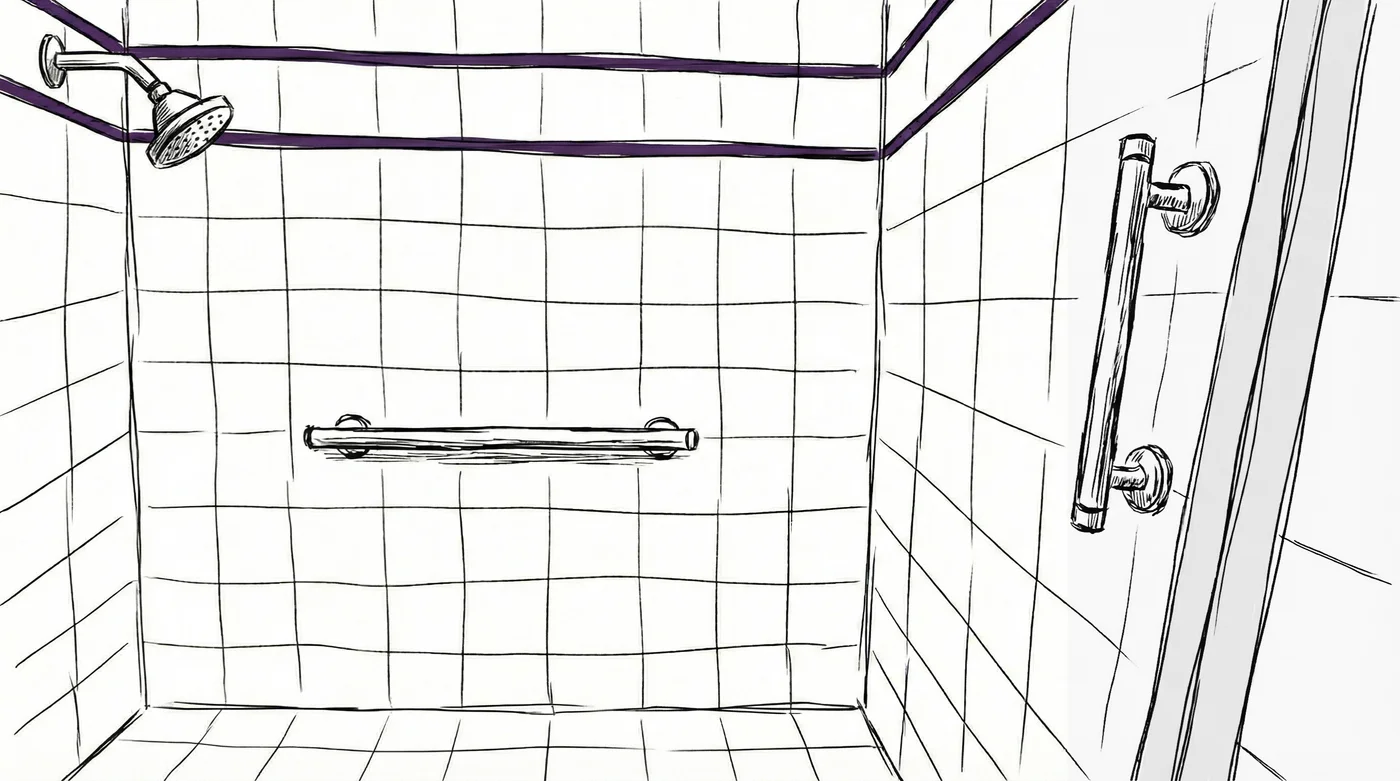
But I watched her struggle with the shower threshold. That lip you step over to get in, something I never think about, was a real obstacle for someone recovering from hip surgery. And a new bathroom wasn’t in the cards. So I looked up ADA recommendations, researched where grab bars would have the most impact, and called a handyman to install them.
Once they were in, the small bathroom went from “manageable” to genuinely safe. She always had something to hold onto, and now she had something designed to be held onto.
It hit me that this is exactly how accessibility works on the web, too. Sometimes the thing that helps the most isn’t a redesign. It’s recognizing what’s already working and reinforcing the parts that aren’t.
The Smart Home Advantage
Before any of this happened, I’d already invested in making my house a Google Assistant-activated smart home. The thermostat, the lights, the TVs, the robot vacuum I affectionately named Zelda, all voice-controlled. I did it because I like gadgets and convenience. But when my mom moved in to recover, all of that infrastructure suddenly became assistive technology.
She could adjust the temperature without getting up. She could turn off the lights from bed. The robot vacuum meant one less reason for either of us to navigate around cords or furniture. None of this was built for her recovery, but it worked seamlessly for it.
This reminded me of something I keep coming back to in my web accessibility writing: the things that help people with disabilities almost always help everyone else too. Captions help people in noisy rooms. Keyboard navigation helps power users. Confirmation steps before purchases help anyone who’s ever tapped the wrong button. The assistive use case and the convenience use case aren’t in tension. They’re the same design decision viewed from different angles.
What I Set Up
Here’s the practical stuff, for anyone who finds themselves in a similar situation:
Living room
- A couch lift so she could hold on when sitting down or standing up because I have a couch that is lower to the ground.
- All rugs removed. If you have one with a lower pile, it’s probably fine so long as there’s something to keep the edges from curling or catching.
- The robot vacuum handled the floors without creating cord hazards.
Bedroom
- A bed rail with a pouch attached, so her TV remote and phone were always within reach.
Bathroom
- Grab bars, installed after I noticed the threshold issue.
- A 24-inch installed horizontally for the tiled wall of the shower (at the ADA recommended height between 33 and 36 inches).
- A 12-inch one installed vertically for grabbing while getting over the threshold (at a higher height than the other one)
- A non-slip shower mat used for inside of the shower floor.
The small size of the room ended up being a feature, not a bug. Between the grab bars and the close walls, she always had stability.
Other
- I recommend night-light-enabled outlets in hallways too, just don’t add them in your bedroom. They’re too bright when you’re trying to sleep.
- My front patio door has no threshold, just a smooth transition from inside to out. My front door does have one. Guess which door became her preferred entrance?
- Google Assistant on the thermostat, lights, TVs, and robot vacuum. What started as a smart home hobby became genuine independence for someone in recovery. My mom could say “Okay Google, have Zelda vacuum the kitchen” without getting up from the couch.
The Same Lesson, Every Time
A recent Wirecutter piece on aging in place walked through home modifications room by room, and reading it felt like a checklist of everything I’d just lived through. But what stuck with me wasn’t the specific product recommendations. It was how much the underlying philosophy mirrors web accessibility.
The experts in that article stressed being proactive: make changes before you need them, not after a fall. One occupational therapist recommended starting adaptations as soon as you’re in your “forever home.” On the web, this is the exact same argument against retrofitting accessibility after launch. Build it in from the start. The cost of adding it later is always higher, in money, in time, and sometimes in real harm to real people.
Both fields also suffer from the same blind spot: assuming the current setup works because it works for you. I never thought about my shower threshold. I never thought about how a rug edge could catch a walker wheel. Just like I once never thought about what happens when a website auto-plays audio over a screen reader, or when a purchase goes through without a confirmation step.
My mom taught me, long before I ever wrote a line of code, that the world isn’t designed for everyone by default. You have to choose to make it that way. That’s true for physical space, and it’s true for the web.
Build It In
If you take one thing from this: don’t wait for someone to struggle before you fix the threshold. Whether that’s a literal threshold in your bathroom or a figurative one in your UI, the best time to address it is before it becomes a barrier.
A few well placed grab bars was the only permanent modification needed, and I’ve found myself using them too. The best accessibility work starts the same way every time: noticing who’s being left out, and choosing to design for them too.
About the Author
I’m Rachel Cantor, a product engineer with over 14 years of experience building production systems. I plan and implement technical architecture that requires a knack for detail and a focus on high-fidelity user experiences. Currently seeking contract opportunities.
Feel free to reach out to me on bear.ink or LinkedIn if you’re looking to build something sharp. 🙌