Per-User JWT Secrets: Enterprise-Grade Token Revocation for External Clients in Wasp
Secure your OpenSaaS with per-user JWT secrets, encrypted storage, and surgical token revocation for external clients.
If you’d like a hand in building this or anything like it, I’m open to taking on new clients. See the end of this article to learn more.
In Parts 1 and 2, we built a complete OAuth-style authentication system for external clients: Chrome extensions, mobile apps, or any client that can’t share your web app’s cookie jar. We covered the database schema, token generation, CORS policies, and refresh flows.
But there’s a problem hiding in our architecture: we’re using a single global JWT_SECRET for all users.
This works fine for many apps. But when you need to revoke all of a user’s external tokens, you have two bad options:
- Rotate the global
JWT_SECRET: This invalidates every user’s tokens and requires coordinated redeployment across all services. - Delete database sessions only: This stops refresh tokens but doesn’t invalidate already-issued access tokens until they naturally expire.
Neither option gives you surgical control. Per-user JWT secrets solve this. By giving each user their own cryptographic signing key (combined with the global secret), you can revoke all external tokens for a single user instantly, without touching anyone else’s sessions.
This is Part 3: where we evolve from a production-ready system to an enterprise-grade one.
The Problem with a Single Global Secret
Let’s revisit how our current implementation signs tokens:
const accessToken = jwt.sign(jwtPayload, JWT_SECRET, {
expiresIn: ACCESS_TOKEN_EXPIRY,
});
Every user’s external JWT is signed with the same key. This creates two limitations:
1. Coarse-Grained Revocation: Deleting UserExternalSession rows stops refresh tokens but doesn’t invalidate already-issued access tokens. Rotating JWT_SECRET invalidates everyone’s tokens, forcing all users to re-authenticate.
2. Increased Blast Radius: If JWT_SECRET ever leaked, an attacker could theoretically sign valid tokens for any user.
The Solution: Per-User Cryptographic Secrets
The fix is simple: give each user their own secret, then derive a combined signing key. To revoke all of a user’s tokens, rotate their secret.
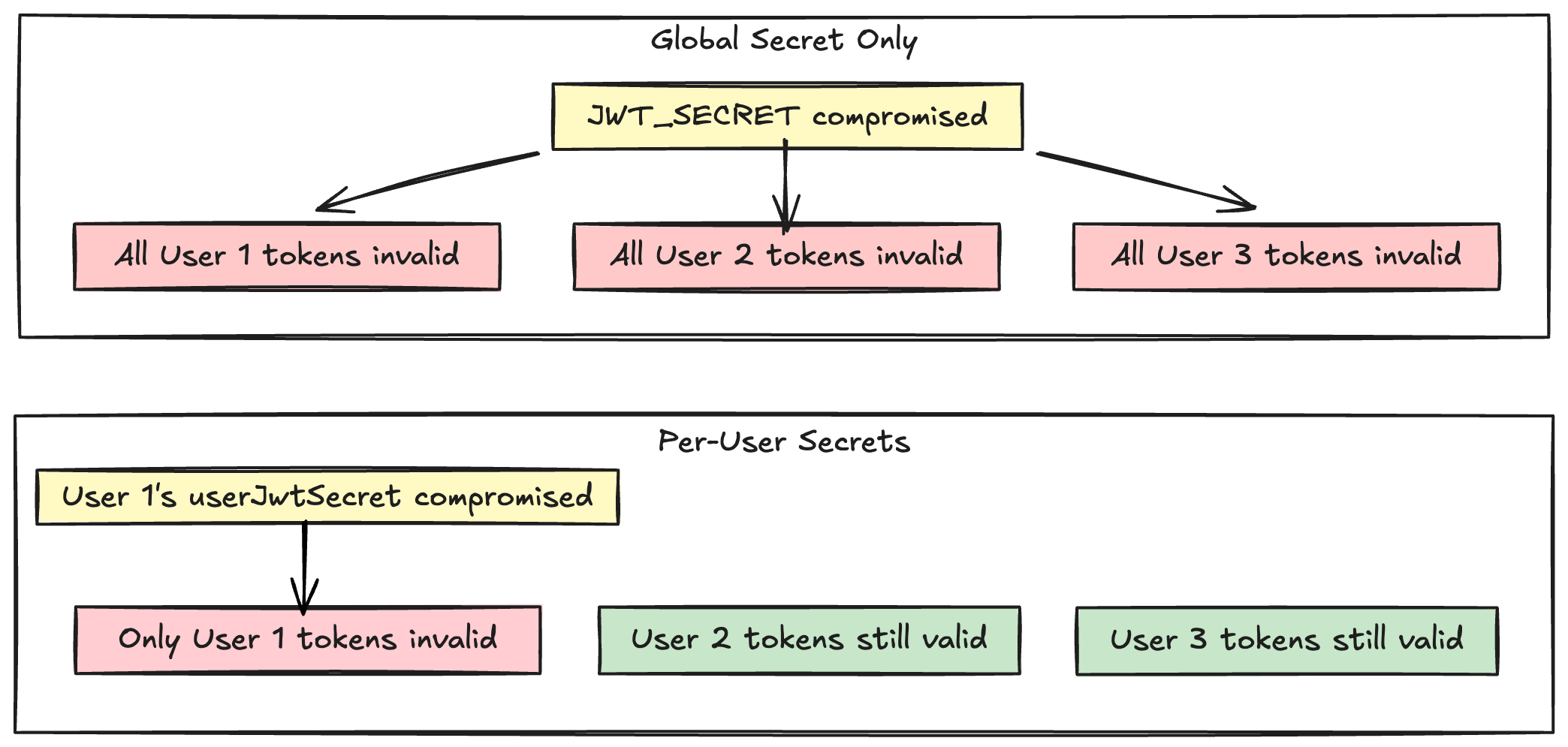
When you rotate a user’s secret, all tokens signed with the old combined key immediately become invalid without affecting any other user.
Design Decisions
Separate Table for Security
Store per-user secrets in a dedicated UserJwtSecret table:
model UserJwtSecret {
id String @id @default(uuid())
userId String @unique
user User @relation(fields: [userId], references: [id], onDelete: Cascade)
secret String // Encrypted at rest
createdAt DateTime @default(now())
updatedAt DateTime @updatedAt
rotatedAt DateTime? // Audit trail
}
Why separate? Most User queries don’t need the JWT secret. A separate table ensures it’s only loaded when explicitly requested, reducing accidental exposure. The rotatedAt field provides an audit trail without cluttering the User model.
Lazy Generation
Only create a UserJwtSecret row when the user first authorizes an external client. Users who never use external clients never get a row in this table. This keeps the table small and makes migration cleaner.
Encryption at Rest
The secret column stores encrypted data using AES-256-GCM with a key derived from JWT_SECRET via HKDF. Even if your database backup is compromised but JWT_SECRET is not, the attacker can’t use the per-user secrets.
HMAC-Based Key Derivation
Combine the global secret with the user secret using HMAC-SHA256:
function deriveCombinedKey(globalSecret: string, userSecret: string): string {
return crypto
.createHmac("sha256", globalSecret)
.update(userSecret)
.digest("base64");
}
Implementation
1. Encryption Layer
Create app/src/auth/external/encryption.ts:
import crypto from "crypto";
const ALGORITHM = "aes-256-gcm";
function deriveEncryptionKey(secret: string, salt: Buffer): Buffer {
return crypto.pbkdf2Sync(secret, salt, 100000, 32, "sha256");
}
export function encryptSecret(plaintext: string, masterSecret: string): string {
const salt = crypto.randomBytes(32);
const key = deriveEncryptionKey(masterSecret, salt);
const iv = crypto.randomBytes(16);
const cipher = crypto.createCipheriv(ALGORITHM, key, iv);
const ciphertext = Buffer.concat([
cipher.update(plaintext, "utf8"),
cipher.final(),
]);
const authTag = cipher.getAuthTag();
return Buffer.concat([salt, iv, authTag, ciphertext]).toString("base64");
}
export function decryptSecret(encrypted: string, masterSecret: string): string {
const combined = Buffer.from(encrypted, "base64");
const salt = combined.subarray(0, 32);
const iv = combined.subarray(32, 48);
const authTag = combined.subarray(48, 64);
const ciphertext = combined.subarray(64);
const key = deriveEncryptionKey(masterSecret, salt);
const decipher = crypto.createDecipheriv(ALGORITHM, key, iv);
decipher.setAuthTag(authTag);
return Buffer.concat([
decipher.update(ciphertext),
decipher.final(),
]).toString("utf8");
}
2. Per-User Secret Management
Add to app/src/auth/external/core.ts:
import { encryptSecret, decryptSecret } from "./encryption";
async function getOrCreateUserJwtSecret(
userId: string,
entities: any
): Promise<string> {
const masterSecret = getJwtSecret();
let record = await entities.UserJwtSecret.findUnique({ where: { userId } });
if (record) {
try {
return decryptSecret(record.secret, masterSecret);
} catch (error) {
// Decryption failed, regenerate
await entities.UserJwtSecret.delete({ where: { id: record.id } });
record = null;
}
}
const plainSecret = crypto.randomBytes(32).toString("hex");
const encrypted = encryptSecret(plainSecret, masterSecret);
try {
await entities.UserJwtSecret.create({
data: { userId, secret: encrypted },
});
return plainSecret;
} catch (error: any) {
// Handle race condition
if (error.code === "P2002") {
const existing = await entities.UserJwtSecret.findUnique({
where: { userId },
});
if (existing) return decryptSecret(existing.secret, masterSecret);
}
throw error;
}
}
If decryption fails, we regenerate the secret. This automatically revokes all tokens signed with the unusable old secret.
3. Update Token Generation
Modify generateTokenForUser in core.ts:
export async function generateTokenForUser(
userId: string,
deviceId: string,
entities: any
) {
const globalSecret = getJwtSecret();
const user = await entities.User.findUnique({
where: { id: userId },
select: { email: true },
});
if (!user?.email) throw new HttpError(404, "User not found");
// Get or create per-user secret and derive combined key
const userSecret = await getOrCreateUserJwtSecret(userId, entities);
const combinedKey = deriveCombinedKey(globalSecret, userSecret);
const jwtPayload: JwtPayload = { userId, email: user.email, deviceId };
const accessToken = jwt.sign(jwtPayload, combinedKey, {
expiresIn: ACCESS_TOKEN_EXPIRY,
});
// Generate and store refresh token (unchanged from Part 2)
// ...
}
4. Update Token Verification
Modify verifyExternalJwt in core.ts:
export async function verifyExternalJwt(
token: string,
deviceId: string,
context: any
): Promise<JwtPayload> {
const globalSecret = getJwtSecret();
// Decode to get userId
const decoded = jwt.decode(token) as JwtPayload | null;
if (!decoded?.userId) throw new HttpError(401, "Invalid token");
const userSecretRecord = await context.entities.UserJwtSecret.findUnique({
where: { userId: decoded.userId },
});
let verified: JwtPayload;
if (userSecretRecord) {
try {
const userSecret = decryptSecret(userSecretRecord.secret, globalSecret);
const combinedKey = deriveCombinedKey(globalSecret, userSecret);
verified = jwt.verify(token, combinedKey) as JwtPayload;
} catch (error) {
// Legacy fallback (remove after migration)
verified = jwt.verify(token, globalSecret) as JwtPayload;
}
} else {
verified = jwt.verify(token, globalSecret) as JwtPayload;
}
// Verify device ID and session (unchanged from Part 2)
// ...
return verified;
}
The legacy fallback allows tokens signed with only the global secret to work during migration. Remove it once all users have re-authenticated.
The Real Power: Surgical Revocation
Create app/src/server/auth/userRevocation.ts:
import crypto from "crypto";
import { encryptSecret } from "../../auth/external/encryption";
export async function revokeAllUserExternalTokens(
userId: string,
entities: any,
jwtSecret: string
): Promise<void> {
const newSecret = crypto.randomBytes(32).toString("hex");
const encrypted = encryptSecret(newSecret, jwtSecret);
await entities.UserJwtSecret.upsert({
where: { userId },
update: { secret: encrypted, rotatedAt: new Date() },
create: { userId, secret: encrypted },
});
await entities.UserExternalSession.deleteMany({ where: { userId } });
}
Hook this into your password change handler:
export const changePassword = async ({ newPassword }, context) => {
// ... validate and update password ...
await revokeAllUserExternalTokens(
context.user.id,
context.entities,
process.env.JWT_SECRET!
);
};
This rotates the user’s secret and deletes all their sessions. All existing access and refresh tokens immediately become invalid, even ones that haven’t expired yet. Other users are completely unaffected. 🎉
Migration Strategy
Option A: Hard Cutover
Deploy the new code and clear all sessions:
DELETE FROM "UserExternalSession";
All users re-authenticate once. Simplest approach for smaller user bases.
Option B: Graceful Migration
The verification code already supports this. As users refresh their tokens over 7 days, they naturally migrate to per-user secrets. After the migration period, remove the legacy fallback.
Testing
Test Per-User Secret Generation:
await makeAuthenticatedRequest("/api/some-endpoint");
Check database:
SELECT * FROM "UserJwtSecret" WHERE "userId" = 'your-user-id';
Test Revocation:
await revokeAllUserExternalTokens("user-id", entities, JWT_SECRET);
Verify: old tokens fail with 401, user can re-authenticate, other users unaffected.
Test Concurrent Generation:
await Promise.all([
makeAuthenticatedRequest("/api/endpoint1"),
makeAuthenticatedRequest("/api/endpoint2"),
]);
Check database for exactly one UserJwtSecret row (unique constraint prevented duplicates).
Security Considerations
Never log:
- Plaintext per-user secrets
- Decrypted values
- Combined keys
- Tokens
Safe to log:
- User ID
- Rotation timestamps
- Encryption failures (without values)
Key management: Store JWT_SECRET in a secure secret manager, not committed .env files and rotate periodically.
Defense in depth: Per-user secrets are one layer. Combined with CORS policies, client allowlists, device IDs, and refresh token rotation, you create a robust system where no single layer’s failure compromises security.
When Per-User Secrets Are Worth It
Consider per-user secrets when:
- You have enterprise customers requiring granular revocation
- You serve multiple untrusted external clients
- Users handle particularly sensitive data
For MVPs or small user bases, the basic system from Parts 1 and 2 is sufficient.
Conclusion
We’ve evolved from a basic OAuth-like flow to an enterprise-grade system with surgical revocation. This is the system running in production for RecipeCast and for external auth handling in my Chrome extension.
Three final pieces of advice:
- Start simple, evolve deliberately: Parts 1 and 2 are sufficient for most apps. Add per-user secrets when you need them.
- Plan for migration early: Structure your code so adding per-user secrets later is a clean evolution, not a rewrite.
- Document your security model: Write down what each layer protects against and what the migration path looks like.
You now have the complete blueprint for external client authentication in Wasp, from basic OAuth flows to enterprise-grade token management.
About the Author
I’m Rachel Cantor, a fullstack engineer with over 13 years of experience building production systems that scale.
I am beginning to take on new consulting clients for any number of projects: authentication systems, component libraries, internal tooling, or technical architecture that requires someone with a knack for detail, who can both design a system, ship production code, and make it all look great.
If you’re dealing with:
- Design systems or component libraries that need to scale
- Chrome extensions or cross-platform integrations
- Internal tools your team hasn’t had bandwidth to build properly
Feel free to reach out to me on bear.ink. 🙌