Storybook MCP Reads Your Manifest, Not Your Docs Tab
I added Storybook's MCP so my agent would stop rebuilding components I'd already shipped. It rebuilt them anyway.
I was watching an agent plan out a feature when it proposed building a text input and a select menu from scratch. Both already existed in our design system. I had shipped them months ago. I had also, that same week, connected the agent to Storybook’s MCP server for exactly this reason: so it would use our components instead of reinventing them.
So why was it about to rebuild two of them?
TL;DR: Storybook’s MCP serves your agent a manifest built from your stories and components. Two things quietly degraded what mine could see. The default docgen extractor returned empty props, which a small config change fixed. And the most useful documentation I had, the guidance about which component to reach for, lived in a field the manifest never reads. The first was a config bug. The second is the one worth your attention: documentation an agent can’t retrieve might as well not exist.
What the MCP actually serves
It helps to be clear about what this tool is, because it is less magic than it sounds. I won’t re-explain the Model Context Protocol; Storybook’s docs do that well. When you add @storybook/addon-mcp and run Storybook, the dev server exposes a set of tools to your agent. The one I leaned on most was get-documentation: hand it a component ID, get back its props, a few example stories, and whatever documentation the manifest holds for it.
That last clause is the whole story. The agent sees the manifest. Not your source, not your Docs tab, not your intentions. The manifest.
The blank props
The first thing I noticed was that get-documentation actions-button came back with a complete component and completely empty props. Every prop was there by name. Every description was blank.
Button’s source had full doc comments on every prop. So the docs existed. They just weren’t reaching the manifest.
The cause was the docgen extractor. Storybook ships with react-docgen by default, which is fast and does a shallow parse. It couldn’t read Button’s prop type, an intersection that pulls in ButtonHTMLAttributes plus a [data-${string}] index signature. Faced with a type it couldn’t statically resolve, it returned nothing rather than guessing.
The fix is to switch to the slower, more thorough extractor in .storybook/main.ts:
const config: StorybookConfig = {
// ...
typescript: {
reactDocgen: "react-docgen-typescript",
reactDocgenTypescriptOptions: {
// Keep the props your component declares; drop the ones that come
// only from node_modules (every inherited HTML attribute).
propFilter: prop =>
prop.declarations?.some(d => !d.fileName.includes("node_modules")) ??
true,
},
},
};
react-docgen-typescript runs the TypeScript compiler instead of a shallow parse, so it resolves the intersection and reads the comments. The propFilter matters because once you turn the compiler loose, it will happily document all of the HTML attributes Button inherits. The filter keeps the props you wrote and drops the ones React handed you.
After the change, the same get-documentation call returns the full prop table, descriptions and all.
One caveat if your components live in a different workspace package than Storybook: the compiler builds its program from the Storybook project’s directory, so inherited types from sibling packages won’t resolve until you add their source to the include option. Mine sit in the same package as Storybook, so this one didn’t bite me. It might bite you.
That was a satisfying fix. It was also not the real problem.
The documentation that was never in the manifest
The props fix solved a question the agent rarely gets wrong: how do I use this component once I’ve chosen it. It did nothing for the question the agent actually got wrong: which component do I choose.
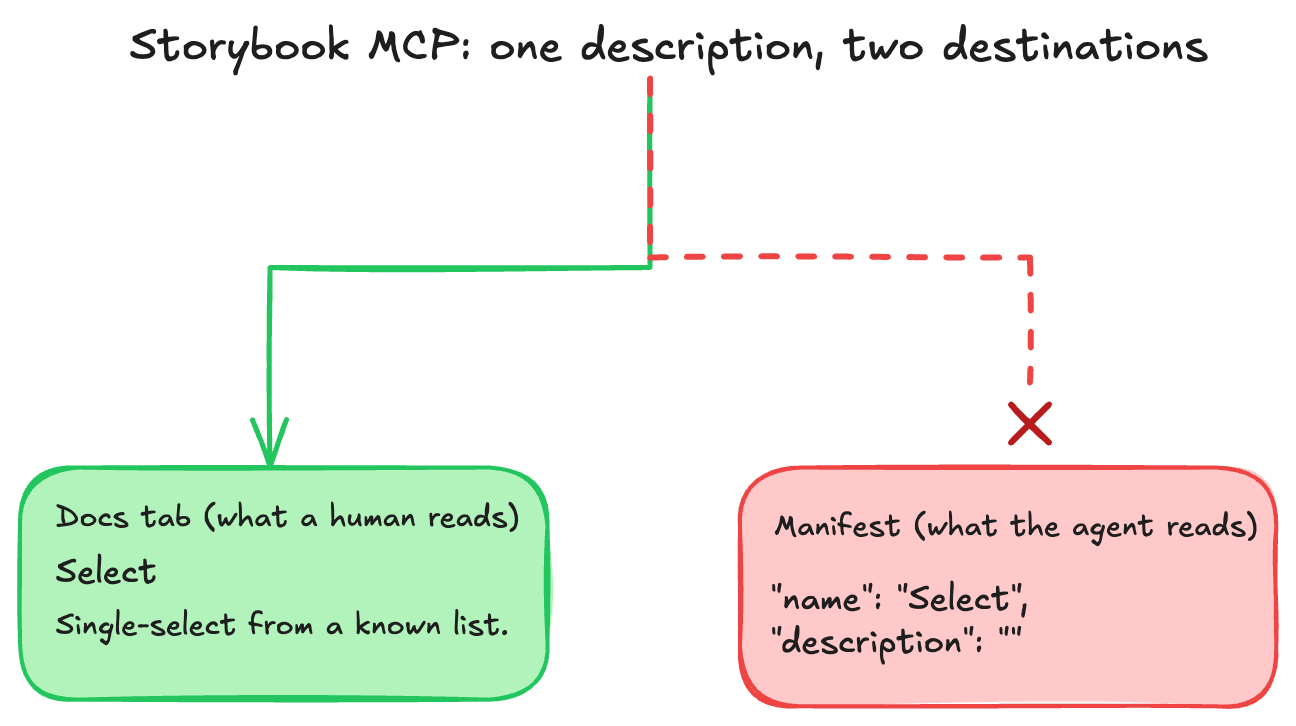
I had written real guidance for that. Each component’s story carried a short note on when to reach for it and when to reach for something else. Select pointed to Segmented for a short exclusive set, to Toggle for a boolean, to TextInput for free text. Badge noted that if you want a clickable chip, you want Button instead. This is the single most useful thing I can hand an agent that is about to pick a component. It is the difference between a lookup and a guess.
None of it was in the manifest.
That guidance lived in each story’s parameters.docs.description.component, the prose that renders at the top of the Docs tab. It looks great to a human reading Storybook in a browser. The manifest doesn’t carry it. I confirmed this by opening the manifest directly, which you can do at http://localhost:6006/manifests/components.json while Storybook runs. Every component’s description field came back as an empty string. The props were rich. The selection guidance simply wasn’t there.
So the tool I had wired up specifically to stop the agent reinventing components was showing it everything except the one thing that would have stopped it. The agent wasn’t being careless. It was working from a manifest where the answer did not exist.
The fix was not clever. I moved that guidance somewhere the agent reads on every session: our CLAUDE.md. The cleaner long-term answer is to write it where the pipeline already looks, but the pragmatic one was to stop relying on a field that never makes the trip.
A smaller trap on the way
One more thing degraded what the agent could see, and it is worth knowing because it looks like a bug in your code when it isn’t. The manifest mirrors a running dev server. The first time I listed components, it returned a subset and silently left out several form primitives, including the Select and TextInput I almost rebuilt. A Storybook restart refreshed the index and they appeared. The docgen results can cache the same way.
When a result looks wrong, cross-check it against your source or git before you act on it. The manifest is a live mirror, not a fixed artifact, and a stale mirror fails quietly.
What actually held the line
I want to be fair to the setup, because most of it worked. A standing instruction in CLAUDE.md, never invent props, look them up, plus the MCP itself, made the agent’s default behavior resistant to hallucination. It checked before it wrote. The floor was higher than it would have been with no tooling at all.
But the floor is not the ceiling. I still nearly shipped duplicate components, and the reason is the whole point: the best documentation I had was sitting in a field the tool couldn’t read, so from the agent’s side it did not exist. What caught it was not the tooling. It was me, telling it to use our components and check them against the source.
The lesson isn’t that the MCP is great, and it isn’t that the MCP is broken. It’s that an agent only ever sees what your pipeline chooses to surface, and when the pipeline drops something, it drops it silently. Making a codebase legible to an agent is not only about writing good documentation. It is about writing it where the machine will actually look.